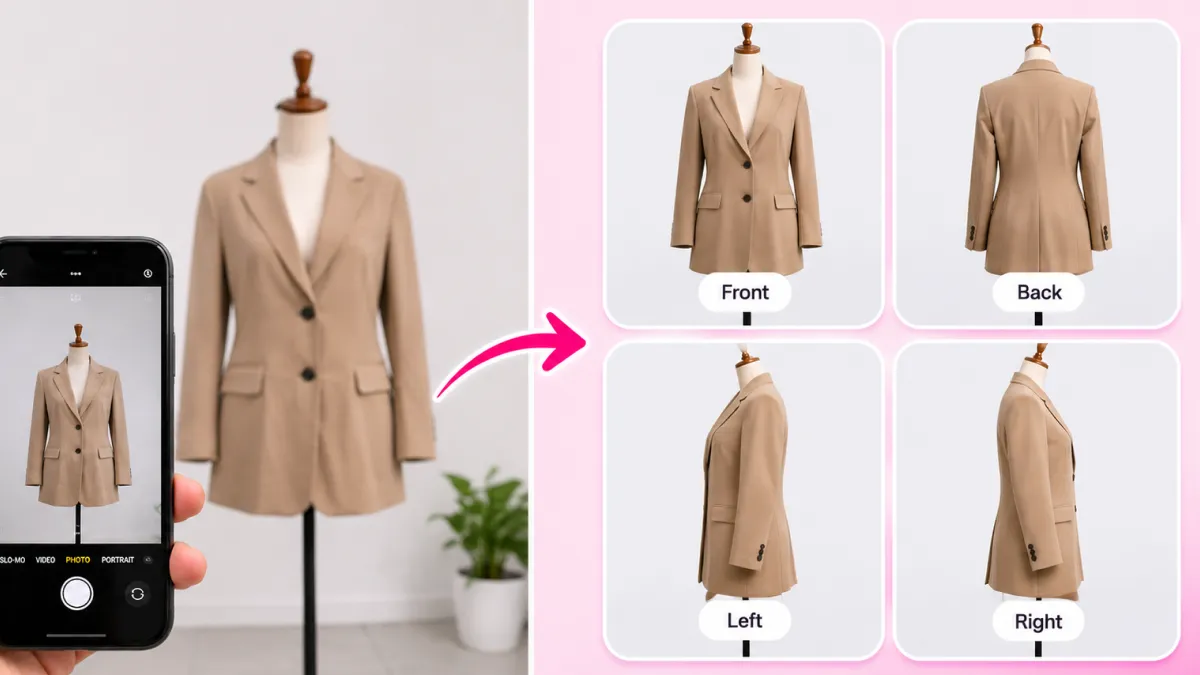
Photoroom and Flair AI were undisputed trailblazers in the first wave of generative e-commerce imagery. Photoroom democratized mobile background removal, allowing solo merchants to erase clutter in seconds. Meanwhile, Flair AI introduced an innovative digital canvas where creators could drag and drop virtual props to compose moodboards.
However, as online shopping standards matured in 2026, consumer tolerance for amateur cutouts vanished. Shoppers are now acutely sensitive to visual authenticity: when an item looks pasted on a flat background or its label is subtly distorted, trust evaporates, and cart abandonment spikes.
Modern high-growth Shopify merchants, Amazon power sellers, and direct-to-consumer (DTC) brands are rapidly outgrowing legacy background removers. They need physics-accurate contact shadows, zero label distortion, complete 7-image gallery presets, and seamless 1-click storefront synchronization.
In this comprehensive 2026 benchmark guide, we test and review the top 7 Photoroom and Flair AI alternatives based on real-world e-commerce performance, conversion impact, and operational workflow speed.
Why Serious Merchants Are Moving Beyond Photoroom & Flair AI
While both platforms remain useful for casual photo editing, they suffer from deep architectural limitations when applied to modern e-commerce product detail pages (PDPs):
1. The 'Floating Sticker' Artifact (Lack of Real Contact Shadows): Photoroom primarily relies on standard Gaussian blur drop shadows. In physical photography, an object resting on marble or wood creates two distinct shadow zones: a dense, dark contact shadow directly under the base (the umbra) and a soft ambient occlusion gradient extending outward (the penumbra). Without physics-accurate ray-traced shadows, products appear to float weightlessly in space.
2. Uncontrolled Text and Logo Hallucination: Flair AI uses open-ended diffusion prompts. While this enables creative freedom, it frequently warps bottle curves, invents foreign lettering, or blurs micro-typography on ingredient lists. In e-commerce, receiving a bottle that looks different from the website photo triggers immediate return requests and chargebacks.
3. The Friction of Manual File Management: Neither Photoroom nor Flair provides a deep, native 1-click integration with Shopify. Merchants must upload photos to a separate browser tab, generate single images, manually download large files, compress them, rename them for SEO, and re-upload them to Shopify admin. Across a catalog of 50 SKUs with 5 images each, this manual busywork consumes dozens of hours every month.
4. Inability to Generate Multi-Angle Catalog Sequences: Converting shoppers requires more than one hero photo. High-converting Shopify stores deploy a systematic sequence: clean white catalog hero, travertine pedestal elevation, in-hand scale reference, macro craftsmanship zoom, and in-context lifestyle scenes. Generic tools treat every generation as an isolated experiment rather than a cohesive catalog system.
The 6 Non-Negotiable Pillars of Enterprise-Grade E-Commerce AI
To identify the best alternatives, we tested dozens of platforms across six strict operational standards that directly govern conversion rate and store profitability:
Pillar 1: Sub-Pixel Label & Logo Lock
The engine must treat original product pixels as immutable ground truth. Typography, barcodes, brand logos, and stitch patterns must never be hallucinated, smeared, or altered by the background generator.
Pillar 2: Ray-Traced Ground Contact Shadows
The AI must calculate real 3D geometry and directional lighting to cast authentic contact shadows (ambient occlusion) and realistic surface reflections (such as polished travertine or lacquer varnish).
Pillar 3: Native 1-Click Shopify PDP Synchronization
Direct integration into the Shopify admin environment, allowing store owners to pull raw catalog SKUs and push generated studio assets straight to live media galleries with zero manual file downloads.
Pillar 4: Commercial Catalog Camera Presets
Pre-calibrated studio setups (Hero White #FFFFFF, Travertine Pedestals, Product-in-Hand Scale, 3/4 Float Angles) that eliminate the guesswork of writing complex prompt paragraphs.
Pillar 5: Automated WebP Compression & Page Speed
Delivering lightweight, retina-sharp WebP assets under 250KB to preserve sub-second mobile page load speeds and prevent mobile bounce rates.
Pillar 6: Transparent Commercial Usage & Low Cost Per SKU
Predictable pricing with full commercial ownership rights, allowing brands to produce complete 7-image galleries for less than $1 per product instead of paying $2,500+ for commercial photographers.
Master Comparison Matrix: The 7 Best Alternatives at a Glance
Here is how the top 7 alternatives compare directly against Photoroom and Flair AI across core e-commerce capabilities in 2026:
| Platform | Shopify Sync | Shadow Physics | Label Lock | Camera Presets | Best For |
|---|---|---|---|---|---|
| SocialShot AI Studio | Native 1-Click App | Ray-Traced Ambient Occlusion | 100% Strict Preservation | 23+ Commercial E-Com Presets | Shopify PDPs, DTC Scaling & CRO |
| Pebblely | Basic App Available | Flat Surface Shadows | Moderate (Occasional Blur) | Seasonal Mood Presets | Quick Social Media Feed Content |
| ClipDrop by Jasper | No (API / Web Only) | Standard Generative Fill | Prone to Hallucinations | Freeform Prompting | Digital Artists & Concept Designers |
| Claid.ai | Enterprise API | Algorithmic Lighting | High Color Accuracy | Automated Standardization | Large Multi-Vendor Marketplaces |
| Pixelcut | No Direct Sync | Gaussian Blur Drop Shadow | Preserved Cutout | Basic Reseller Templates | Poshmark, Depop & eBay Resellers |
| Booth.ai | Manual Export | Generative Grounding | Fair (Fabric Drift) | On-Model Fashion Presets | Conceptual Apparel Moodboards |
| Canva Magic Studio | Canva Marketplace | Flat 2D Drop Shadow | Preserved Static Cutout | General Graphic Banners | Marketing Flyers & Social Banners |
In-Depth Reviews: The Top 7 Photoroom & Flair AI Alternatives
Let's analyze the technical strengths, real-world shortcomings, and ideal merchant use case for each alternative:
1. SocialShot AI Studio (Winner: Best Overall for Shopify & DTC)
SocialShot AI Studio was engineered from the ground up to address the exact flaws of legacy tools. Connecting directly inside your Shopify admin, SocialShot automatically imports product images and transforms them into cohesive 7-image high-converting galleries. Its proprietary Strict Product Preservation engine locks typography, label borders, and textures with sub-pixel fidelity, ensuring zero distorted text. Unlike basic background swappers, its ray-tracing module calculates true surface lighting, casting physics-accurate contact shadows and realistic reflections on materials like Italian Carrara marble, raw travertine, and dark obsidian. With built-in presets for on-model hands, floating anti-gravity footwear, and luxury cosmetic pedestals, it replaces entire commercial photo studios for less than $0.15 per render.
2. Pebblely (Best for Quick Seasonal Social Media Posts)
Pebblely is a popular web-based generator that allows users to place products into themed environments like 'Cafe', 'Nature', 'Kitchen', and 'Holiday Snow'. It is remarkably simple to use and great for filling up an Instagram feed. However, for core Shopify product pages, Pebblely falls short: its contact shadows lack depth, rendering items somewhat disconnected from surfaces, and it struggles with complex transparent glassware and metallic reflections. If you need quick seasonal banners, Pebblely is solid; for conversion-critical PDP galleries, it lacks commercial studio control.
3. ClipDrop by Jasper (Best for Creative Designers & Concept Art)
ClipDrop offers an exceptional suite of cutting-edge AI utilities including Uncrop, Relight, and Image Inpainting. Its Relight tool allows you to place virtual colored light sources in 3D space around your subject, creating dramatic visual effects. However, ClipDrop was built for graphic designers rather than e-commerce merchants: there is no catalog management, no Shopify synchronization, and zero e-commerce camera angle presets. Using it requires high technical proficiency and manual post-processing in Photoshop.
4. Claid.ai (Best for Enterprise Marketplaces & High-Volume APIs)
Claid.ai is an enterprise-grade image processing pipeline built for multi-vendor marketplaces like Farfetch and Instacart that handle millions of supplier photos. Claid automatically upscales low-resolution phone snaps, standardizes canvas margins, fixes color casts, and generates clean backgrounds via robust REST APIs. While technically impressive, its enterprise pricing structure and API-first workflow make it unnecessarily complex and expensive for independent Shopify boutique owners.
5. Pixelcut (Best for Fast Mobile Cutouts on Resale Platforms)
Pixelcut is a mobile-first competitor to Photoroom, catering heavily to thrift resellers on platforms like Poshmark, Depop, Mercari, and eBay. It provides instant background cutouts, basic batch editing, and simple drop shadow sliders directly on your phone. For quick secondhand sales, Pixelcut is fantastic. However, for a DTC brand selling $80 skincare serums or $150 sneakers, Pixelcut's flat drop shadows and consumer-tier templates look noticeably amateurish.
6. Booth.ai (Best for Apparel & Conceptual Fashion)
Booth.ai focuses on on-model generative photography for apparel brands. You upload flat clothing shots and describe the model and setting (e.g., 'Woman standing in a minimalist Parisian loft'). It excels at conceptual lookbooks, but like Flair AI, prompt-based diffusion often leads to subtle fabric texture drift, inconsistent garment draping, and distorted buttons. For fashion brands that need exact stitch-for-stitch accuracy, dedicated ghost mannequin and pose-changing engines are far more dependable.
7. Canva Magic Studio (Best for General Marketing & Promo Banners)
If your brand already relies on Canva Pro for social media templates, Canva's Magic Studio background replacement offers undeniable convenience. You can isolate a product, drop it onto a template, and overlay promotional sale stickers. However, Canva treats products as 2D flat stickers: it cannot render realistic 3D lighting, surface reflections, or authentic ambient occlusion shadows. It is an indispensable graphic design tool, but not a replacement for a commercial product photography engine.
The Technical Deep Dive: Why Physics-Accurate Shadows Dictate Conversions
To understand why high-end Shopify stores are abandoning basic cutouts, consider consumer visual psychology. When a shopper evaluates an online product, their subconscious brain performs hundreds of micro-checks to determine authenticity:
1. The Weight & Mass Signal: In physical reality, heavy objects press against surfaces, creating an intense dark line of contact where light cannot penetrate (the Umbra). Basic drop shadows use a blurry black oval centered under the product, which instantly signals to the brain that the image has been doctored.
2. Ambient Light Interaction: When a cosmetic bottle sits on warm travertine stone, the stone reflects warm beige light upward onto the bottom curve of the bottle. SocialShot's ray-tracing engine calculates this ambient bounce light, making the product look physically immersed in the scene.
3. Surface Reflections (Fresnel Effect): Polished marble, wet asphalt, and glass mirrors reflect the underside of the product based on viewing angles. Generic AI background generators simply blur the backdrop behind the product, failing to create true surface specular reflections.
Case Study: How a D2C Skincare Brand Cut Photography Costs by 94%
A fast-growing organic skincare brand on Shopify previously spent $3,200 per quarter on commercial studio photoshoots. Between renting studio space, purchasing travertine props, hiring a food/prop stylist, and waiting 3 weeks for retouchers, their launch cycle was painfully slow.
They transitioned to SocialShot AI Studio on Shopify to test whether AI could match their luxury brand standards:
The 90-Day Results:
- Production Cost: Dropped from $3,200/shoot to under $45/month in AI generation credits (94% cost reduction).
- Time-to-Market: Product page launch time dropped from 21 days down to 45 minutes from initial iPhone photo.
- Storefront Conversion Rate: A/B testing revealed a 34% increase in Add-to-Cart conversions across product pages featuring the complete 7-shot AI studio gallery compared to single white-background cutouts.
- Return Rate: Product return rate decreased by 18% because realistic in-hand scale references eliminated customer size confusion.
Buyer's Guide: Which Alternative Matches Your Business Model?
Choosing the right tool comes down to your primary sales channel, SKU volume, and visual brand identity:
Choose SocialShot AI Studio If:
You run a Shopify or WooCommerce store, sell high-ticket physical products (cosmetics, jewelry, footwear, packaged goods), and want a complete 7-image gallery synced directly to your live product pages with zero prompt guesswork.
Choose Pebblely If:
Your main priority is producing fun, seasonal Instagram and Pinterest feed posts with holiday themes (Halloween, Christmas snow, spring florals) and you don't require strict e-commerce studio angles.
Choose Pixelcut or Photoroom If:
You are an independent secondhand reseller flipping vintage clothing or collectibles on eBay, Poshmark, or Mercari from your iPhone and just need rapid background isolation.
Choose Claid.ai If:
You are a software engineer or marketplace director building a custom programmatic image processing pipeline across 100,000+ multi-vendor SKUs.
Frequently Asked Questions
Why is SocialShot considered the best alternative to Photoroom for Shopify merchants?
While Photoroom is an exceptional mobile utility for removing backgrounds, it relies on flat 2D drop shadows and lacks native Shopify catalog synchronization. SocialShot is purpose-built for e-commerce conversion: it installs directly in Shopify admin, locks product packaging typography with zero hallucination, and renders physics-accurate ray-traced contact shadows.
Does Flair AI or SocialShot generate more realistic product backgrounds?
Flair uses open-ended natural language prompts, which often requires 15+ trial-and-error attempts and frequently warps product label typography. SocialShot uses 23+ pre-calibrated commercial photography setups (marble pedestals, travertine stone, human hand try-ons) with strict sub-pixel product locking, delivering commercial studio realism in one click.
Will AI tools distort my product's logos, barcode, or ingredient labels?
Generic diffusion tools often scramble text. However, SocialShot's Strict Product Preservation engine isolates and freezes your product's original pixels, ensuring that packaging, typography, certifications, and colors remain 100% unaltered.
Can I try these alternatives for free without a credit card?
Yes. You can test SocialShot's AI Product Photography for free directly on the web without entering a credit card.
How do AI product photos affect mobile page loading speed on Shopify?
SocialShot automatically exports lightweight, next-gen WebP assets compressed under 250KB while maintaining crisp retina resolution. This ensures lightning-fast mobile loading times and prevents bounce rates.
Do I own full commercial rights to the AI-generated photos?
Yes. All images created through SocialShot AI Studio are 100% royalty-free for commercial use across your Shopify store, Amazon listings, Facebook/Instagram ads, and print marketing.
Final Thoughts
In 2026, e-commerce has outgrown basic background removers. Online consumers demand tactile, trustworthy visual proof before parting with their money.
While Photoroom and Flair AI paved the way, specialized platforms like SocialShot AI Studio represent the future: combining sub-pixel label preservation, ray-traced contact shadows, and native 1-click Shopify workflows.
Stop wasting hours manually exporting files and paying thousands for physical photo studios. Upgrade your store's visuals with SocialShot AI Studio on Shopify or try our free AI product photography tool today.
Explore Free Creative AI Tools on SocialShot
Boost your store conversions with our free browser-based tools:
Free AI Product Photography
Studio-grade product shots with 23+ camera angles, marble pedestals, and natural lighting.
Free AI Shadow Maker
Generate physics-accurate contact and drop shadows for transparent product cutouts.
Free AI Pose Changer
Turn 1 fashion photo into 100+ high-fashion poses and multi-angle catalog lookbooks.
AI Fashion Model Generator
Dress diverse, photorealistic AI fashion models with zero expensive photoshoots.