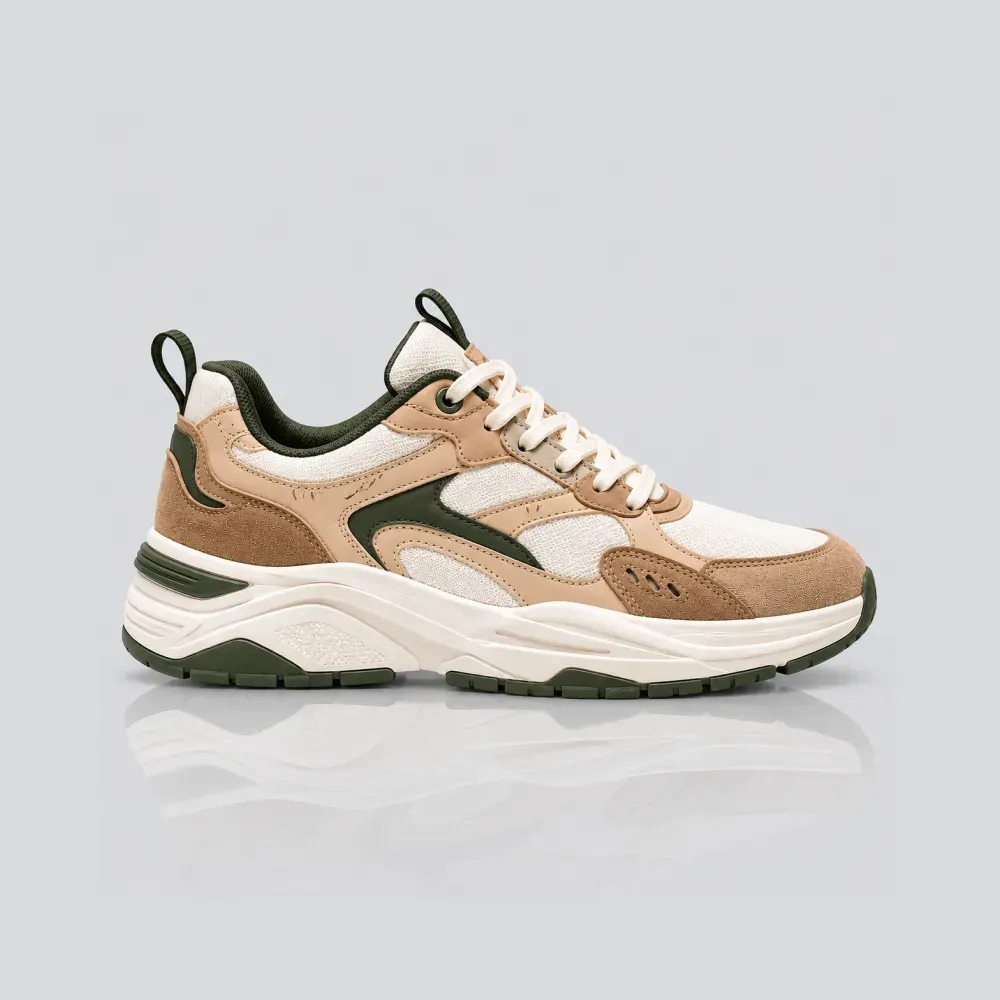
Every day, thousands of e-commerce brands use 1-click background removal tools to isolate their products on pure white canvases.
The background is instantly gone, but so is something far more critical: the physical relationship between the product and the ground.
Without contact shadows, an item appears to float in a zero-gravity void. It ceases to look like a physical, tangible object you can hold and instead resembles a cheap digital sticker. Here is the neuroscience behind why flat cutouts ruin buyer trust—and how to fix them with realistic contact shadows.
The Neuroscience of Visual Trust: Why the Brain Hates Floating Objects
The human visual cortex has evolved over millions of years to gauge mass, proximity, and danger through lighting gradients. When your eyes observe an object in real life, your brain automatically looks for its contact point with the surface beneath it.
In e-commerce, shoppers cannot physically pick up your merchandise. They must rely entirely on visual cues to estimate density, build quality, and scale.
When an item lacks a grounded contact shadow, it triggers the subconscious Uncanny Valley effect. Shoppers may not consciously analyze the lighting, but their brain signals: *'Something about this isn't real.'* That micro-second of cognitive dissonance directly fuels cart abandonment and page bounces.
What the Human Brain Expects to See Under Every Physical Object:
- A crisp, dark contact line (the umbra) directly where the product touches the floor
- Soft ambient occlusion shading radiating outward to convey curvature and mass
- A directional light gradient matching the ambient highlights on the product body
- Realistic surface reflections on glossy planes like glass, acrylic, or polished stone
The Anatomy of a Photorealistic Shadow: 3 Crucial Layers
A professional studio shadow is never just a blurry black oval. True physics-accurate lighting consists of three distinct visual layers working in harmony:
1. The Contact Shadow (Umbra)
The darkest, narrowest band situated immediately beneath the product's base. Because light cannot enter the microscopic gap between the object and the floor, this shadow is razor-sharp, grounding the product firmly to prevent the floating look.
2. Ambient Occlusion (Penumbra)
The soft, diffused gradient that expands outward from the base. It simulates indirect bounce light being blocked by the product's body, giving circular bottles, shoes, and tech accessories a sense of three-dimensional volume.
3. The Directional Cast Shadow
The elongated shadow cast away from the primary key light. It reveals the exact position of the light source, matching the highlights on your product's surface to create visual harmony.
3 Common Shadow Mistakes That Scream 'Amateur'
Adding a bad shadow is often worse than having no shadow at all. Watch out for these three common post-production traps:
1. The 2005 Photoshop Drop Shadow Halo
Applying a generic Gaussian drop shadow with a uniform blur radius creates a hazy black aura floating behind the item. Real shadows get softer the further they travel from the object; uniform halos look synthetic.
2. Mismatched Light and Shadow Angles
If specular highlights on your perfume bottle come from the top-left, but the shadow extends toward the left, the brain immediately detects the physical impossibility, destroying perceived credibility.
3. Pure Pitch-Black (#000000) Shadows
Natural shadows are never 100% black in real environments. They absorb ambient bounce light from surrounding walls and surfaces. Pure black shadows look like holes cut into your webpage.
4 Rules for Grounding Your E-Commerce Catalog
Before publishing your updated product catalog, follow these visual consistency guidelines:
1. Standardize shadow angles across your catalog: Ensure all products on your collection grid share the same virtual light direction so your storefront looks cohesive.
2. Adjust shadow intensity by weight: Heavy boots and cast-iron cookware naturally demand deeper contact shadows than lightweight sunglasses or silk scarves.
3. Keep transparent backgrounds for theme flexibility: Export with transparent alpha channels so your contact shadows blend seamlessly across white, dark mode, or colored theme cards.
4. Pair shadows with luxury surfaces: Take grounding a step further by staging items on travertine or marble plinths using our Shopify 7-shot product gallery framework.
Frequently Asked Questions
What is the difference between a drop shadow and a contact shadow?
A drop shadow is a general duplicate of the object blurred behind it. A contact shadow is a physics-based, sharp shadow specifically placed where the object touches the ground to convey physical weight and gravity.
Do pure white background Amazon photos require shadows?
Yes! While Amazon requires a pure white (#FFFFFF) background, top-ranking listings always include subtle contact shadows under the product base so it looks grounded rather than clipped.
Can I add realistic contact shadows to transparent PNG files?
Yes. SocialShot Free AI Shadow Maker allows you to drag-and-drop any transparent PNG cutout and automatically renders realistic contact shadows with adjustable angles, blur, and opacity.
Does adding contact shadows really improve conversion rates?
Yes. A/B tests across e-commerce brands consistently show that grounded products look higher quality and more authentic, leading to lower bounce rates and higher click-to-cart conversion.
Final Thoughts
In e-commerce, small visual details carry massive psychological weight. A flat cutout makes your store look like a discount drop-shipper, while a grounded product with realistic contact shadows radiates premium craft.
Take your isolated product cutouts today.
Run them through the SocialShot Free AI Shadow Maker or explore AI Product Photography to ground your catalog and earn instant buyer trust.
Explore Free Creative AI Tools on SocialShot
Boost your store conversions with our free browser-based tools:
Free AI Product Photography
Studio-grade product shots with 23+ camera angles, marble pedestals, and natural lighting.
Free AI Shadow Maker
Generate physics-accurate contact and drop shadows for transparent product cutouts.
Free AI Pose Changer
Turn 1 fashion photo into 100+ high-fashion poses and multi-angle catalog lookbooks.
AI Fashion Model Generator
Dress diverse, photorealistic AI fashion models with zero expensive photoshoots.