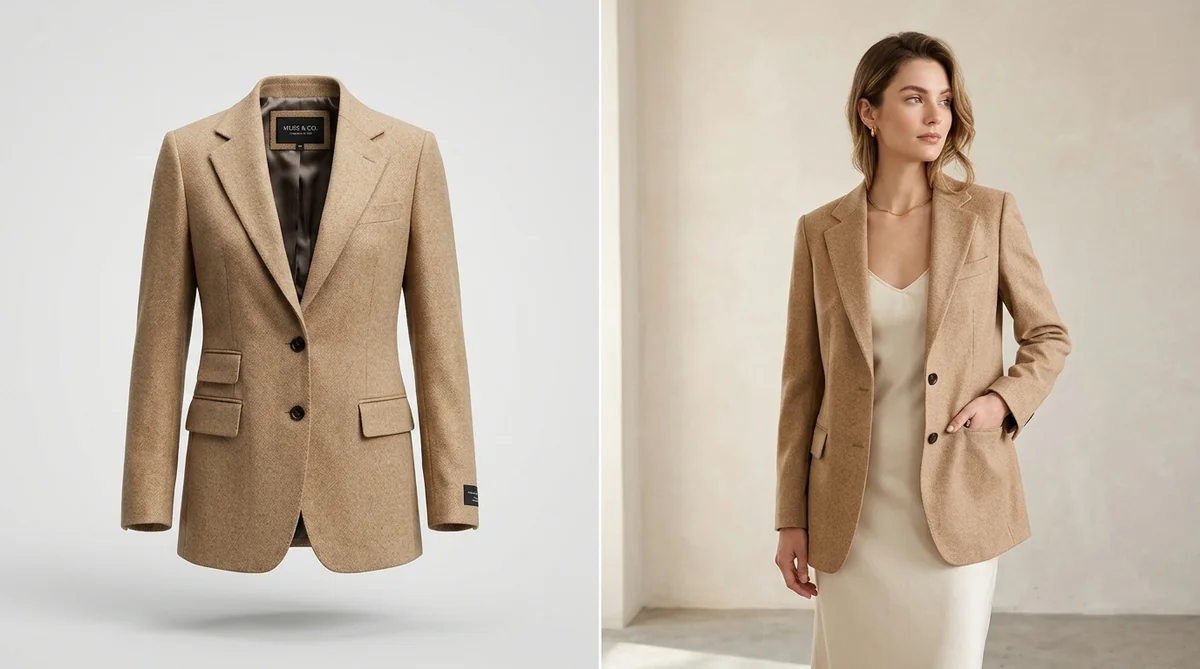
When setting up an apparel or fashion store on Shopify, founders and creative directors face an eternal debate: Should you display clothing on hollow ghost mannequins or on real human models?
Proponents of ghost mannequin (invisible mannequin) photography praise its clean, distraction-free aesthetic that puts 100% of the focus on the garment's cut, inner lining, and seams. On the flip side, on-model photography injects emotion, lifestyle aspiration, and vital fit context that flat forms can never replicate.
The truth? Modern data reveals that choosing just one leaves money on the table. In this guide, we break down the conversion rates, production costs, and customer psychology behind both formats—and reveal why the hybrid visual strategy powered by SocialShot AI Studio on Shopify delivers the highest conversion rates and lowest return rates in 2026.
How It Works: From Flat Lay to 100+ Studio Poses
Transform flat lays, hanger photos, or single model shots into a complete multi-angle commercial lookbook in under 2 minutes.
Upload Raw Photo
Snap a smartphone flat lay, hanger photo, or single model shot on any background.
Select Poses & Models
Pick from 100+ natural poses, diverse photorealistic models, and editorial studio lighting angles.
Export 4K Lookbook
Download high-res assets formatted for Shopify galleries (1:1), Meta feeds (4:5), and TikTok (9:16).
The Case for Ghost Mannequin: Clean, Structural Precision
Ghost mannequin (also known as invisible mannequin or 3D hollow mannequin) photography creates the illusion that an invisible human is wearing the garment. It remains a staple for luxury fashion and wholesale catalogs for good reason:
100% Garment Focus
Zero model hair, facial expressions, or body types to distract the buyer. The garment's cut, drape, and color take center stage.
Inner Lining & Tailoring
Accurately showcases inner collar tags, neck construction, and interior lining that physical models cover up.
Standardized Catalog Aesthetic
Creates an ultra-uniform, minimalist grid layout across collection pages, making it easy for shoppers to scan catalog items.
The Traditional Production Pain
Physical shoots require two separate photos per SKU plus tedious manual Photoshop compositing ($30–$50 per image).
The Case for On-Model: Emotion, Drape & Aspirational Fit
While ghost mannequins excel at technical product display, on-model imagery is what turns passive browsers into paying customers:
Drape & Kinetic Motion
Shoppers see how fabric moves, stretches, creases, and breathes when walking or seated—answering *how will this feel on me?*
Emotional Lifestyle Connection
Consumers buy aspiration. Models in chic environments create an immediate emotional lifestyle hook that drives higher add-to-cart clicks.
Drastically Lower Returns
Showing actual shoulder fit, drape, and waist taper cuts apparel returns by up to 20% by eliminating sizing surprises.
The Traditional Cost Hurdle
Physical shoots require booking agencies, studio rentals, and hair/makeup artists—routinely costing $3,000–$5,000 per collection.
Head-to-Head: Ghost Mannequin vs. On-Model Photos
Here is how both formats stack up across key e-commerce performance metrics:
| Evaluation Metric | Ghost Mannequin (Invisible Mannequin) | On-Model Photography |
|---|---|---|
| Primary Conversion Driver | Structural clarity & design inspection | Lifestyle aspiration & fit confidence |
| Average Add-to-Cart Lift | +15% (for tailored/formal apparel) | +35% to +47% (for casual, dresses, street) |
| Customer Return Impact | Neutral (shows cut, but not body fit) | High impact (cuts returns by up to 20%) |
| Best Placement on PDP | Secondary packshot / detail inspection | Hero image (Slide 1) & social ad creative |
| Production Time with AI | Under 10 seconds with SocialShot | Under 60 seconds with SocialShot AI Models |
The Winning E-Commerce Formula: The 70/30 Hybrid Strategy
Top 7-figure fashion brands on Shopify (like Gymshark, ASOS, and Reiss) don't pick sides—they combine both formats into a high-converting PDP visual hierarchy:
The battle-tested 4-step gallery architecture:
- Slide 1 (Hero On-Model): An aspirational on-model front shot that grabs attention on search feeds and collection grids.
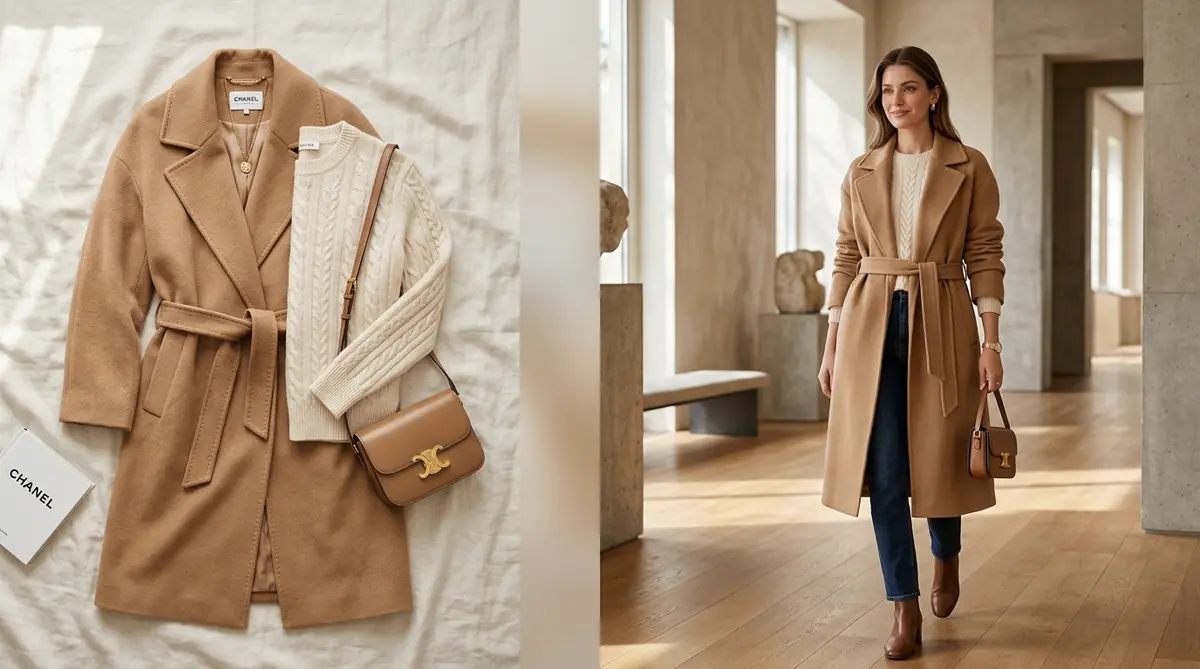
- Slide 2 (Ghost Mannequin Packshot): A clean, hollow 3D view showing exact garment silhouette, neckline, and interior lining.
- Slides 3–5 (Dynamic On-Model Poses): Walking, seated, 3/4 profile, and rear views demonstrating movement and draping.
- Slide 6 (Macro Fabric Close-Up): Close-up texture on button stitching, fabric weave, and hardware quality.
Data Takeaway: Stores using this hybrid sequence achieve 2.4x higher conversion rates compared to stores using ghost mannequin or on-model shots in isolation.
Frequently Asked Questions
Which image should be the main hero photo on Shopify?
For apparel, on-model images consistently outperform ghost mannequins as the primary hero shot (Slide 1) because human faces and bodies drive higher click-through rates from collection pages and social media ads.
Are ghost mannequin shots still necessary if I have AI models?
Yes. Ghost mannequins serve as the perfect secondary packshot (Slide 2 or 3) allowing buyers to inspect the physical garment's construction, inner lining, and neckline without model distraction.
Does SocialShot require Photoshop skills for ghost mannequins?
No. SocialShot's AI automatically removes mannequins, reconstructs the inner collar and label, and balances lighting with zero manual Photoshop editing required.
Can I use the same model across ghost mannequin and on-model shots?
Yes. SocialShot allows you to maintain strict garment fidelity so the hollow ghost mannequin and the on-model photographs display the exact same fabric grain, color, and seams.
How does SocialShot sync these images to my live Shopify store?
SocialShot AI Studio connects directly to your Shopify Admin. You can select any product SKU and publish both ghost mannequin and on-model assets straight to your product gallery with a single click.
Final Thoughts
The debate between ghost mannequin and on-model photography is over: high-converting Shopify stores use both.
By pairing clean 3D ghost mannequin packshots with emotional, diverse on-model editorial poses, you give shoppers the ultimate visual confidence to click 'Buy Now'.
Install SocialShot AI Studio on Shopify today and automate your complete apparel photography pipeline.
Explore Free Creative AI Tools on SocialShot
Boost your store conversions with our free browser-based tools:
Studio-grade product shots with 23+ camera angles, marble pedestals, and natural lighting.
Turn 1 fashion photo into 100+ high-fashion poses and multi-angle catalog lookbooks.
Dress diverse, photorealistic AI fashion models with zero expensive photoshoots.
Generate physics-accurate contact and drop shadows for transparent product cutouts.