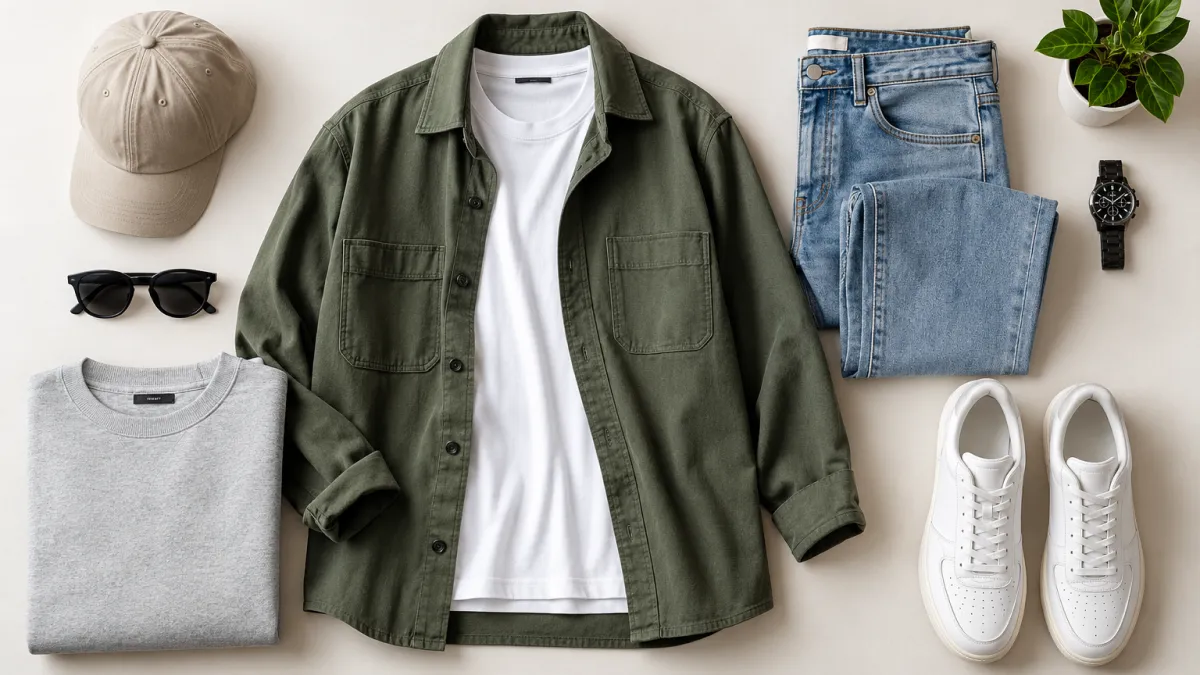
The overhead flat lay is one of the most popular formats for fashion stores: garments neatly styled on linen, wood or marble, shot from directly above.
Getting that look usually means studio space, lighting, background boards and hours of styling and retouching. With AI, a clear phone photo is enough to get a clean, store-ready flat lay in seconds.
Shoot clothes on your phone and turn them into pro flat lay photos for Shopify, Etsy and Instagram with AI. Step-by-step guide, no studio needed.
Why Traditional Apparel Photoshoots Slow You Down
For small brands, Etsy sellers and dropshippers testing new products, every new item or colour means another shoot.
The common bottlenecks:
- Photographer and studio costs for every collection
- Lighting that changes through the day, so your product grid looks mismatched
- Days of waiting between receiving samples and getting edited photos back
Step 1: Snap a Clear Photo on Your Phone
You don't need a lightbox or DSLR. Lay the garment flat on any surface — a bedsheet, floor or desk — and shoot from roughly straight above.
For the best result:
- Shoot near a window in daylight
- Keep the whole garment inside the frame
- Hold the phone parallel to the clothing
- Small wrinkles and messy backgrounds are fine
Step 2: Pick Your Background Surface
Upload your photo to the SocialShot Flat Lay Clothing tool and choose a surface that matches your brand.
White Studio & Light Gray
Clean catalogue look for Shopify and marketplace listings.
Linen, Cream & Marble
A soft, premium feel for womenswear and boutique brands.
Wood & Concrete
Natural texture for streetwear, denim and outdoor apparel.
Reference Image
Upload a moodboard photo and match its surface, styling and light.
Also available: Soft Beige, Pastel Pink, Pastel Blue, Warm Neutral, Dark Charcoal, Gradient, Paper, Stone and AI Generated.
Step 3: Build a Complete Outfit
"Complete the look" posts perform well on Instagram. Upload up to 5 items — for example a hoodie, chinos, sneakers and a watch — and SocialShot arranges them into one balanced, top-down outfit shot.
Step 4: Export the Right Size for Every Platform
Choose the aspect ratio before you generate so the shot fits where you'll post it.
- 1:1 square for Shopify collections and Etsy listings
- 4:5 portrait for Instagram and Facebook feeds
- 9:16 vertical for Stories, TikTok and Pinterest
Why AI Flat Lays Look Real
SocialShot keeps your actual garment — its colour, print, fabric texture and details — and rebuilds the surface and lighting around it.
- Perfect overhead angle with soft, even light
- Natural shadows, not a flat cut-out sticker look
- Try several surfaces in minutes to see which one fits your store best
Frequently Asked Questions
Will the AI change the colour or pattern of my clothing?
SocialShot is instructed to preserve each garment's exact design, colour, fabric texture and details, and only change the surface and lighting.
Can I put several items in one flat lay?
Yes. Upload up to 5 product photos and they are styled together as one outfit.
Can I match my brand's existing look?
Yes. Choose Reference as the background and upload an example image to match its surface, styling and lighting.
Do I need Photoshop or editing skills?
No. Upload your photo, pick a surface and generate.
Final Thoughts
Great product photos no longer need a studio budget. A phone photo and the right surface are enough to make your store look professional.
Upload your apparel photo and generate your first flat lay in seconds.